Search
Search
Library Welcomes New Water Resources Librarian
Though only in his second month at the UCR Library, Kent LaCombe is already in the midst of several projects designed to help better preserve and provide access to the library’s rich collection of water-related materials. As the Water Resources Librarian he is responsible for managing and curating the library’s unique contemporary and historic materials devoted to all aspects of water resources held in both the Special Collections’ Water Resources Collections and Archives (WRCA) and in the general collection.
LaCombe’s educational and professional background make him well-positioned to oversee the growth and evolution of a collection that currently boasts more than 200,000 technical reports, 1,500 specialized newsletters, 5,000 maps, 200 manuscript collections, and 45,000 historic photographs documenting water history. He holds a Ph.D. in Environmental History from Kansas State University where his dissertation focused on freshwater ecosystems, specifically environmental change in Lake Huron during the nineteenth and twentieth centuries. Before coming to UCR LaCombe was an Assistant Professor of Libraries at the University of Nebraska-Lincoln where he served as an embedded liaison librarian in the School of Natural Resource Sciences. LaCombe also holds an M.L.S. from Emporia State University and has extensive experience working in libraries, archives, and museums. Most notably he served as the Assistant Director of Vermont’s Brownell Library and was the Search and Sorting Supervisor at Kansas State University’s Hale Library.
LaCombe has often described this position as a “dream appointment” for him that perfectly matches his specialized abilities, experience, and long-term professional goals. He views this position as the perfect vehicle for applying his expertise and passion for both information science and water studies. Through everything from resource visibility, promotion and teaching to donor cultivation, he is prepared to drive the building, enhancement, maintenance, and delivery of the library’s world class water resources collection. The library is pleased to welcome LaCombe to our team and with him at the helm we are excited to witness the new and exciting directions that this world class research collection is headed.
Special Collections & University Archives
About Us
Special Collections & University Archives houses archives and manuscript collections, photographs, maps, books, and other rare or unique research material that document a wide range of subject areas. Our reading room is located on the 4th floor of the Tomás Rivera Library.
We offer many services to help you access and interact with our collections. You may:
Librarians are Here to Help at the Rivera Help Desk
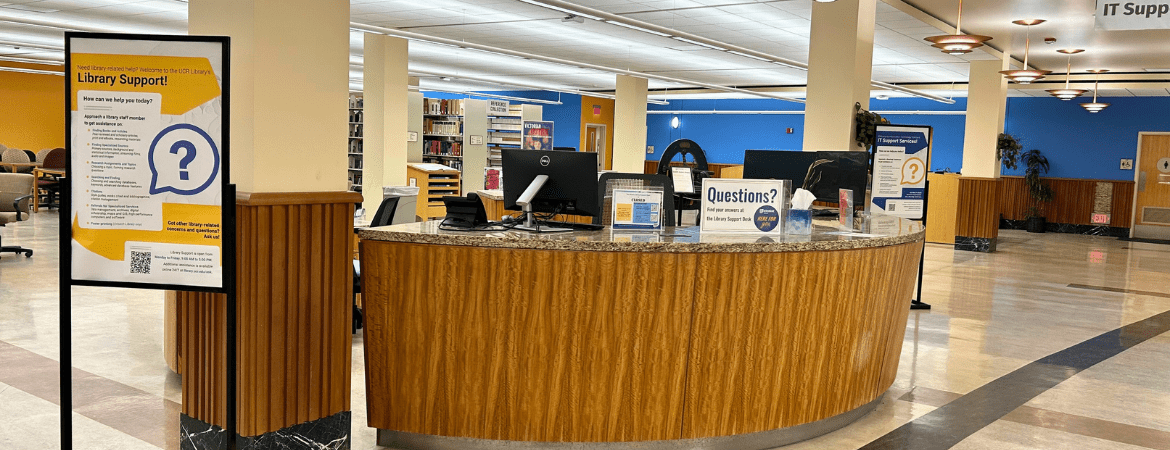
UCR students looking for support with their coursework, research, or general library questions have another valuable resource at their disposal: librarians are now available at the Help Desk in Rivera Library.
Located at the combined Library Support/IT Support Desk, this service offers in-person help for a wide range of needs. Since the start of the academic year, the number of students seeking in-person help has increased by 32% compared to the same period last year, demonstrating that more students are turning to the library for guidance.
Bringing librarians back to the Help Desk is part of the library’s efforts to support students in their academic success. According to Britt Foster, Director of Teaching and Learning, this change helps ensure students have access to the guidance they need when navigating their research and assignments. “Student success research has demonstrated that relationships with university faculty and staff have a positive impact on student engagement and sense of belonging: by having librarians very visible and available to our students, the hope is the Help Desk is a place where these relationships can form,” Britt said.
Today’s information landscape is increasingly complex, and students often need support not only in finding sources but also in evaluating them. Britt explained that “now it’s less about finding information, and more about efficiently navigating the flood to find high quality, relevant resources.” Librarians can help students develop these skills, offering practical strategies for identifying credible materials and managing research challenges.
Students are encouraged to visit the Help Desk for a wide variety of questions, from finding books and e-books to developing effective search strategies. Librarians are also equipped to help students verify citations, particularly as issues with inaccurate references generated by AI tools have become more common.
“We can help with almost anything”, Britt says. “Probably the unofficial model of reference is, I might not know the answer, but I know how to find it.”
Britt emphasized that students should feel comfortable seeking help at any stage of their research process. “Wherever you are in your research process, we’re excited to join you there,” she said. “Librarians want research help to feel like a warm conversation where we focus on getting you to your goals.”
Trained student assistants are also available at the Help Desk in both libraries. Their work not only supports patrons but contributes to their own professional growth. One student assistant researched technology to improve accessibility at the Help Desk, while another is developing a guide for evaluating social media posts. These projects reflect the library’s commitment to both quality service and meaningful mentorship experiences.
For students looking to get the most out of their visit to the Help Desk, Britt recommends bringing assignment details, if possible, as this can help librarians connect students with the most relevant resources. Most importantly, she encourages students to visit sooner rather than later. “The only thing that kills us at the desk is when our upper division or grad students say, I wish I had known I could get this kind of help from the library sooner! ”
Librarians are available at the Rivera Library Help Desk, located at the combined Library Support/IT Support Desk, from 10 a.m. to 2 p.m., Monday through Thursday. Students are encouraged to stop by, ask questions, and take full advantage of this valuable support system.
Wepa printing service launches at UC Riverside
The UCR Library and UCR Information Technology Solutions prepared this brief tutorial to introduce you to our new Wepa Cloud Printing system at the University of California, Riverside.
Here’s what you’ll learn in this tutorial:
- How to create a Wepa account
- How to upload and print documents using Wepa
- Where to find Wepa print kiosks on the UCR campus
The launch date for the new Wepa cloud printing system at UCR is September 17, 2018.
There are 14 Wepa print kiosks located at several different locations on the UCR campus:

Wepa cloud printing has four basic steps:
- Create your account
- Select funds
- Upload documents
- Release the print job
There are also four benefits to using the Wepa system that we didn’t have with other printing services:
- Anyone can print with Wepa, not just UCR students, faculty and staff.
- Patrons now have more ways to pay, not just with Bear Bucks.
- You can send print jobs to Wepa from home -- or anywhere with an internet connection.
- You can print from any type of device, not just computers.
How to create a Wepa account
If you’re on campus, simply walk up to the closest Wepa kiosk and swipe your R’Card on the right side of the screen, and set up a 6-digit PIN
You can also set up an account from home. To do so, go to wepanow.com, then click the blue “login” button in the upper right-hand corner.
Next, choose the University of California, Riverside from the drop-down menu labeled “School.”
Once you select UC Riverside, the browser should automatically redirect you to the Central Authentication Service (CAS) screen, where you’ll log in with your UCR NetID and current password.
How to deposit funds into your Wepa account
After you’ve logged into your Wepa account, you should see your account balance right below your name. All UCR students will receive $8 in their Wepa account every quarter. This replaces your quarterly Quota printing allowance.
UCR students will receive discounted pricing for the new Wepa printing service.
Currently registered UCR students, staff, faculty, and visitors will pay (with partial costs offset by the Student Technology Fee):
- $0.08 for B&W, 1 sided
- $0.13 for B&W duplex
- $0.35 for color, 1 sided
- $0.65 for color duplex
If you need to print more pages, click “add more” to deposit additional funds.
You have three choices for how to pay for additional printing: Bear Bucks, credit card or PayPal.
With Wepa, each credit card transaction will have a $0.40 processing fee added. However, if you pay for extra pages at the kiosk with your Bear Bucks, there are no additional fees.
How to upload documents to the Wepa cloud
From inside the member portal at Wepanow.com, click “Document Upload.”
You can link your cloud storage drives to your Wepa account (Google Drive, Box, OneDrive, Dropbox, or Office 365). Click on the green button at the right of the screen to link your accounts.
You can also upload individual files from a computer, smartphone, or tablet. To upload a file from a computer, first, click the “Choose Your File” button. Follow the prompts to select the file from your drive.
Then, you’ll select print options, including:
- number of copies
- single or double sided
- black & white or color printing
- print all the pages in your document or a specific range of pages
- page orientation (portrait or landscape)
Once you have all of your print options selected, click “Send Print Options.” (Please note: you can’t change your print options at the Wepa kiosks for documents you've uploaded to the Wepa cloud.)
The next screen should say “Review the Results.” Your document has been uploaded to the cloud, and you just need to go to the nearest Wepa print station and enter the 6-digit code you received to release the file. (Please note: the code shown in the tutorial video is an example only.)
How to release your print job at a Wepa kiosk
In order to release your print job, log in at the Wepa kiosk by swiping your R’Card using the card reader on the right side of the screen. First-time users will be asked to create a 6-digit PIN code, to protect your Wepa account.
Once logged in, review your Wepa account balance at the top right of the screen, right below your name. At this time, if you need to add funds, you can do so at the kiosk. (Use the card reader on the left side of the screen to add funds.)
On the left side of the screen, you’ll see the list of files you’ve uploaded to your Wepa cloud. Documents that you’ve uploaded to Wepa will be available to print for up to 6 days.
Tap the box next to the document you want to print, or tap the box at the very top of the list to select all files.
The green button at the bottom of the screen will display the total price for your print jobs. Tap this button to continue.
For your security, be sure to log out of your Wepa account when you’ve finished printing. The green logout button will appear in the lower right corner of the screen. The Wepa print station will automatically log you out after 10 seconds of idle time, after your last print job has completed.
To review:
Print from your laptop or desktop computer

Print from your smartphone

Print from your tablet

If you need support or have any trouble with your Wepa account, please reach out to Bear Help. Bear Help is available by phone Monday through Friday from 8 a.m. until 5 p.m.: (951) 827-4848. After-hours inquiries, please contact Bear Help by emailing bearhelp@ucr.edu, or you can use the online self-help guide.
Water Resources Collections & Archives
Located in: Orbach Science Library, Special Collections & University Archives
The Water Resources Collections & Archives (WRCA) acquires, preserves, and provides access to materials that document water-related issues throughout the United States and beyond, with a particular emphasis on issues affecting the state of California.
Coming Soon: VR workshops and programming
We are pleased to announce that the UCR Library was recently awarded the Create with VR Grant from Unity and Meta Immersive Learning.
This will position the UCR Library at the forefront of innovative teaching and learning by putting virtual reality (VR) technology and training in the hands of our staff.
We will receive 20 Meta Quest 2 VR headsets that will allow us to help train students to become the creators of tomorrow in the growing, high-wage VR industry.
Innovative Media Librarian Alvaro Alvarez applied for VR headsets on behalf of the UCR Library’s Creat’R Lab. He intends to use the headsets in workshops and plans to make them available to the wider UCR community for use in coursework, research, or just for fun.
Unity and Meta Immersive Learning are also providing Alvaro access to professional development opportunities to build his knowledge of VR development and expand his capacity to create innovative and engaging learning experiences for UCR students.
“Right now, I am taking a five-week course,” Alvaro explained. “They teach us best practices on managing the headsets and how to teach different kinds of workshops.”
Once the headsets are ready for use, Alvaro plans on reaching out to faculty who are already teaching VR in the hope that the 20 Creat'R Lab VR headsets can be used as an additional resource for their students.
The launch date for the headsets is still to be determined. However, they will be available sometime during this academic school year. Follow us on social media for updates!
Research Support
We're here to help. Ask a Librarian online, in person or text. Browse Research Guides
Mastering Medical Information: The Role of AHIP in Medical Librarianship

Our Medical Education and Clinical Outreach Librarian Elisa Cortez is a Distinguished Member of the Academy of Health Information Professionals (AHIP).
The Academy of Health Information Professionals is an arm of the Medical Library Association (MLA), dedicated to advancing the field of health information management. AHIP recognizes the professional achievements and expertise of health information professionals through a comprehensive credentialing program.
AHIP's credentialing program is designed to ensure that health information professionals are not only competent but also continuously advancing in their field. This is particularly vital in the health and medical sector, where the accuracy and timeliness of information can have profound implications.
Our Medical Education and Clinical Outreach Librarian Elisa Cortez is a member of AHIP, and her membership was recently renewed at the Distinguished level — the highest level membership you can achieve.
“I like that AHIP encourages lifelong learning,” Elisa said. “An AHIP membership is a recognition of your efforts and lets employers and those you work with know you’re well prepared to do your job.”
Distinguished level membership requires candidates to have at least ten years of full-time professional experience, demonstrating a long-term commitment to the field.
Additionally, candidates must complete a minimum of 120 points of professional accomplishments, which includes a strong emphasis on continuing education to keep up-to-date on the latest developments and practices in health information. 10 of these points must be earned through active participation in professional associations, with a minimum of 5 points derived from activities specifically associated with the MLA. This requirement underscores the importance of engaging with the broader professional community and contributing to the field of health information.
Elisa’s Distinguished level membership embodies the UCR Library’s dedication to offering the highest standard of health information services. It's a journey of continuous learning and leadership, benefiting our entire medical school community.
Innovation celebration: the Creat’R Lab marks its first anniversary
“One year after launch, we have been blown away by the energy, talent, and sheer diversity of projects displayed in the Creat’R Lab,” said Ann Frenkel, Deputy University Librarian.
On the evening of Thursday, May 3, Orbach Science Library hosted more than 90 guests who came to celebrate those successes and enjoy some birthday cake at the Creat’R Lab Anniversary Showcase.
In talking about the genesis for the Creat’R Lab, Frenkel remembered, “Our students kept emphasizing that there was no other independent, inclusive space on campus devoted to project making. They also wanted a place that would allow collaborators to find each other — to put artists together with engineers, social scientists, and scientists.”
So the UCR Library, in partnership with the Office of Research and Economic Development (RED), turned this vision into the Creat’R Lab, a living, state-of-the-art technology incubator for discovery, innovation, and entrepreneurship.
Professors and students alike now call the Creat’R Lab “home” because it fosters experimentation and teamwork, according to Michalis Faloutsos, Director of Entrepreneurship at RED. “It’s also hosting some entrepreneurial activities of EPIC,” he said, referring to UC Riverside’s Entrepreneurial Proof of Concept and Innovation Center.
The showcase featured success stories from several Creat’R Lab users, including third-year Electrical Engineering student Gustavo Correa, whose Arduino electronics and programming workshops had such a high turnout that he had to move attendees to a larger room in Orbach Library to accommodate the class size.
Gender and sexuality studies professor Mzilikazi Koné described how her class collaborated with the Creat’R Lab on their zines project (hand-made magazines). “Zines are the ultimate project of creating something tactile, something you can pick up and pass around and marvel at,” Koné explained. “Zines center art and creativity as central to the project of learning – not as a side note. It is the front note.”
“My interaction with the Creat’R Lab generated a new world of amazing opportunities,” said earth sciences professor Christodoulos Kyriakopoulos of his project, which involved a 3D-printed model and a planned Virtual Reality model of California’s earthquake faults.
Each of the four panelists acknowledged the support and contributions of Creat'R Lab staff members Krista Ivy, maker services librarian, and Michele Potter, open research librarian.
Director of Research Services Brianna Marshall, who oversees the Creat’R Lab, announced the founding of a Steering Committee to engage student and faculty perspectives and provide guidance on future lab workshops, programming, staffing, space usage, equipment purchases, and program goals.
“I can’t overstate how excited we are for this new committee and the input and fresh ideas they’ll be bringing to the lab!” Marshall said.
Inaugural faculty and academic staff members of the Creat’R Lab Steering Committee include Konstantinos Karydis (Technology/Engineering), Haibo Liu (Social Sciences), Juliette Levy (Arts/Humanities), Christos Kyriakopolous (Science/Math), Michalis Faloutsos, Director of Entrepreneurship (RED), and Jay Gilberg (Entrepreneur in Residence, RED).
Student committee members are Patrick Le (ASUCR student representative) and Fahed Elkhatib (Technology / Engineering student representative). The Steering Committee intends to recruit three more student representatives. Any students interested in joining the Steering Committee should contact Brianna Marshall for more information.
Inaugural UC GIS Week a success despite COVID challenges
The first-ever UC GIS Week was a resounding success thanks to the ingenuity and passionate support of the UCR community, according to Geospatial Information Librarian Janet Reyes.
COVID-related event cancellations in 2020 inspired UCR to pivot from planning a UCR-only GIS Day event to participating in the inaugural UC GIS Week virtual conference. Reyes and Elizabeth Perez, Campus Space / GIS Coordinator from UCR’s office of Planning, Design and Construction, both made significant contributions to the conference planning activities. “It was a collaboration across all UC campuses,” Reyes said.
Held on Nov. 17-19, 2020, UC GIS Week provided an opportunity for attendees to learn and engage with experts and mapping projects across the UC system and beyond, Reyes explained. “They could ask questions during the thematic mapping panels, engage with GIS industry professionals, interact with poster presenters, and connect during social events.”
With 865 attendees from across the UC system and the general population, UC Riverside ranked fourth in participation, despite our enrollment numbers ranking seventh of the 10 UC campuses. “Only UCLA, UC Berkeley, and UC San Diego had more attendees,” Reyes added.
In addition, five of the 64 conference presenters were from UC Riverside:
- Nicolas Barth, Assistant Professor of Geology
- Ahmed Eldawy, Assistant Professor in Computer Science
- Emily Esposito, graduate student in Psychology
- Andre Mere, graduate student in Earth and Planetary Sciences
- Elia Scudiero, Assistant Research Agronomist at the USDA-ARS US Salinity Laboratory
“It will happen again next year and hopefully for years to come,” Reyes said. She credited the high level of Highlander participation to an increasing interest in GIS and geospatial study at UCR, as well as to robust publicity efforts. “Attendance has been increasing at our monthly GIS/Geospatial Meetups, and for workshops in the Geospatial series offered by the Research Services department,” she added.
In addition to conference planning, Reyes also created the UCR GIS Profile for the UC GIS Hub, which was launched during the plenary session. “The Hub will help GIS users throughout the UC system connect with each other, compare notes, find expertise, and more,” she explained.
Recordings of the sessions are all available on the UC GIS Week website.
A committee of GIS advocates at UC Riverside will continue to explore ways for UCR GIS users to connect with useful information and with each other. To get involved with GIS at UCR, please contact Janet Reyes.